
Discover the future of Firm AI for the business of law
On November 10, see how Intapp Celeste brings Firm AI to life as the operating layer for professional firms.
· 6 min read
Part 1 made the strategic case: governance-first deployment prevents compliance exposure later. So let’s audit what that actually looks like at your firm.
When did you last audit whether AI workspaces at your firm were shared outside the authorized matter team, and what did you find? If the answer is ‘we haven’t’ or ‘we’d need to ask IT,’ you’re not behind. According to Intapp’s 2026 Technology Perceptions Survey, 93% of professionals report that clients are already aware their firm uses AI—and that awareness is showing up in Outside Counsel Guidelines (OCG) reviews as a documentation requirement. In OCG reviews, firms are increasingly being asked to document how they prevent unauthorized AI access to restricted matters.
According to Intapp’s 2026 Technology Perceptions Survey, 76% of professionals at law firms have used an unauthorized AI tool for work. That statistic gets headlines. The harder problem is the tools IT sanctioned. When a firm deploys Microsoft Copilot, it connects to SharePoint and queries across every site the requesting user can access. SharePoint permissions determine what access the user has. It does not reflect the firm’s matter team membership lists, its active lateral screens, or its ethical wall policies. Those governance layers live in a different system. Copilot doesn’t check them.
The result is an AI tool working exactly as designed, in a firm whose compliance obligations it has no visibility into. A partner opens Copilot to research a client question. Permission drift happens quietly. A routine IT reorganization adds an attorney to a practice group SharePoint site. That site inherited permissions from a matter site that should have been restricted to a closed team. Six months later, a lateral hire joins that practice group. An active screen exists for that attorney in the Document Management System (DMS), but not in those inherited SharePoint permissions — the two systems never synced. A partner opens Copilot to research a client question. Copilot returns documents from every site the partner can access. The firm’s wall policies never reached that part of the system.
The question isn’t whether your AI tools are configured correctly. It’s whether ‘correctly configured’ means the same thing to your IT team as it does to your GC.
Overshared SharePoint sites are the most common finding, and the least surprising once you understand how permissions drift. A matter site is correctly scoped at launch. Six months later, a routine IT reorganization adds an attorney to a practice group site that has inherited permissions from that matter site. An active screen on that attorney in the DMS may not extend to those inherited permissions. The access pathway opened quietly, in a system the compliance team doesn’t monitor.
AI tools with access to the firm’s matter history can surface documents across engagement boundaries when no matter-level access controls extend to those tools. The tool isn’t bypassing anything. There is simply nothing to bypass. A governance layer that doesn’t extend to AI platforms isn’t a governance layer.
According to Schellman’s 2026 State of AI Governance Report, 74% of firms claim they’re audit-ready for AI governance, but only 27% actually are. The ones who have audited their AI workspace access know exactly why the gap exists. The ones who haven’t are about to close it—or discover it on a client’s OCG review.
Most firms have an AI policy. Few have built a governance posture — the operational infrastructure that makes the policy real. A policy describes what’s permitted. It doesn’t check whether access has drifted, whether a permission change six months ago created a gap, or whether the AI tool a partner opened this morning had visibility into matters it shouldn’t.
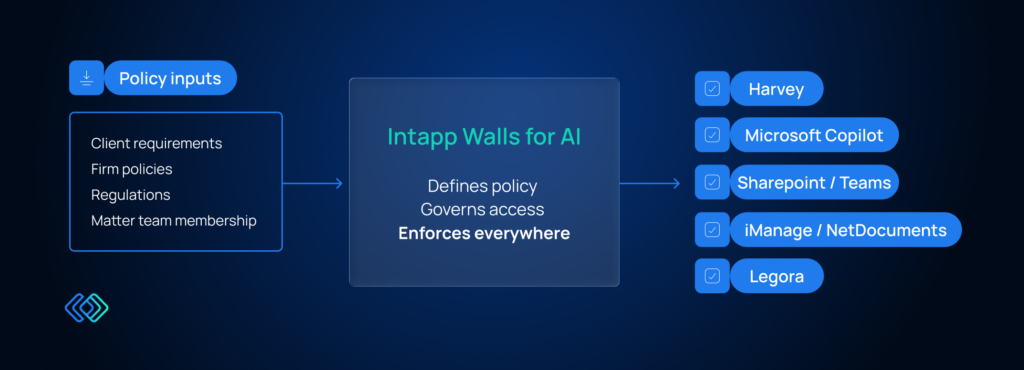
Define information barriers once and propagate them automatically to every system that touches matter data—so a latera l screen change doesn’t trigger separate IT actions in the DMS, Microsoft 365, and each AI platform. AI access needs to be visible in the same workflow compliance teams use to manage ethical walls, not buried in an IT report filed three days after a GC’s request. Access decisions need to be checked at the moment a request is made, not reconstructed from logs after a client flags a concern.
Firms that have built this posture can answer an auditor’s question in hours. Firms that haven’t are answering it by pulling records across four systems and hoping the timeline holds up.
The audit question from the top of this piece — when did you last check your AI workspace access, and what did you find — is the entry point to the pilot-to-production checklist. It’s where firms separate what they assume about their governance from what’s actually true.
Once a firm audits and finds permission drift, they face a choice. They can rebuild permissions manually: change an attorney’s screen in the DMS, push that change to Microsoft 365, then coordinate the same change across Copilot and every other AI platform separately. That takes weeks, spreads risk across multiple systems, and drifts immediately when the next lateral hire or reorganization happens.
Or they can add a governance layer that reaches everywhere at once. But here’s the catch most firms discover: if they’re on on-premises Walls, that layer doesn’t reach into cloud AI tools at all. Part 3 explains why on-premises infrastructure stops at a boundary you didn’t know existed—and what Walls for AI solves on the other side of it.
Intapp Walls for AI is designed to let firms define information barriers once and propagate them across their DMS, Microsoft 365, and AI platforms — rather than requiring separate updates in each system. The Pilot-to-Production Checklist maps the governance questions firms need to answer before moving from limited AI deployment to firm-wide rollout — and flags which items require Walls for AI. Take the checklist to see where your firm stands.
From the blog

VP, GM Time
Engagement intelligence links time, terms, and outcomes so each matter sharpens the next one’s pricing and staffing. See how law firms compound profitability.

Practice Group Leader - DealCloud
See how four DealCloud with Celeste playbooks support law firm business development, from meeting prep to conflicts clearance. Watch the webinar.
VP, GM Time
Law firms lose revenue before billing ever starts. Learn how Firm AI closes leakage through automatic time capture and billing compliance.
 Blog Posts
Learn more
Blog Posts
Learn more
Take the 20-point checklist to see exactly where your firm stands.
