Part 2 revealed what happens when firms audit their AI workspace access. Most find permission drift. Many discover that approved tools are surfacing data they didn’t intend to share. Part 1 established the governance principle. Part 3 addresses the infrastructure reason why that principle is hard to enforce.
Your on-premises information barriers work—but they stop at the boundary of cloud AI tools. If your firm is on on-premises Intapp Walls, your information barriers are working. Lateral screens propagate. Matter walls hold. The DMS respects them. That’s because on-premises Walls was designed to enforce access controls only within systems it directly manages. Microsoft Copilot, Harvey, Legora, and the AI tools that follow them operate through cloud APIs—outside that boundary. On-premises Walls has no visibility into those API calls, which means it has no ability to enforce your information barriers against them. You have governance in one system. Your lawyers have AI tools operating in a completely different one.
What firms are finding when they look
The firms that have audited their AI workspace access after moving to Intapp Walls for AI consistently find the same thing: the on-premises configuration was correct for the DMS. It wasn’t correct for Microsoft 365, because Microsoft 365 permissions had drifted between the original configuration and the audit. Copilot had been drawing from sites that on-premises Walls had no visibility into.
93% of professionals report that clients are already aware their firm uses AI, according to the Intapp 2026 Technology Perceptions Survey. A client’s governance policies prohibit unapproved AI access to their matter data and asks for evidence of controls will get one of two answers: a compliance report pulled from a governance system, or a request for more time while IT assembles records from multiple platforms. Intapp Walls for AI makes the first answer possible. On-premises Walls doesn’t.
What on-premises Walls can’t see
When a lawyer opens Copilot and submits a prompt, Copilot queries SharePoint based on that user’s Microsoft 365 permissions. On-premises Walls doesn’t intercept that query—it doesn’t even know it happened. Result: if the user has inherited access to a SharePoint site that should be behind a wall, Copilot surfaces documents from that site. The wall that exists in your DMS simply doesn’t exist in that interaction.
Cloud migration to Walls for AI closes that visibility gap—it brings information barrier enforcement into the cloud platforms where your lawyers actually work.
The same constraint applies to every AI tool operating through a cloud API. Harvey queries the firm’s matter history through its own API. Legora accesses matter data for AI-assisted work. Agentic workflows make data requests and decisions without manual review—a Walls for AI deployment governs those decisions; an on-premises one doesn’t. None of these interactions pass through on-premises Walls. Your policies govern what a lawyer can open in the DMS. They don’t govern what an AI tool can surface on their behalf.
On-premises Walls enforces the policies you defined for a document management world. Every AI tool your firm deploys operates outside that boundary.
What Intapp Walls for AI adds
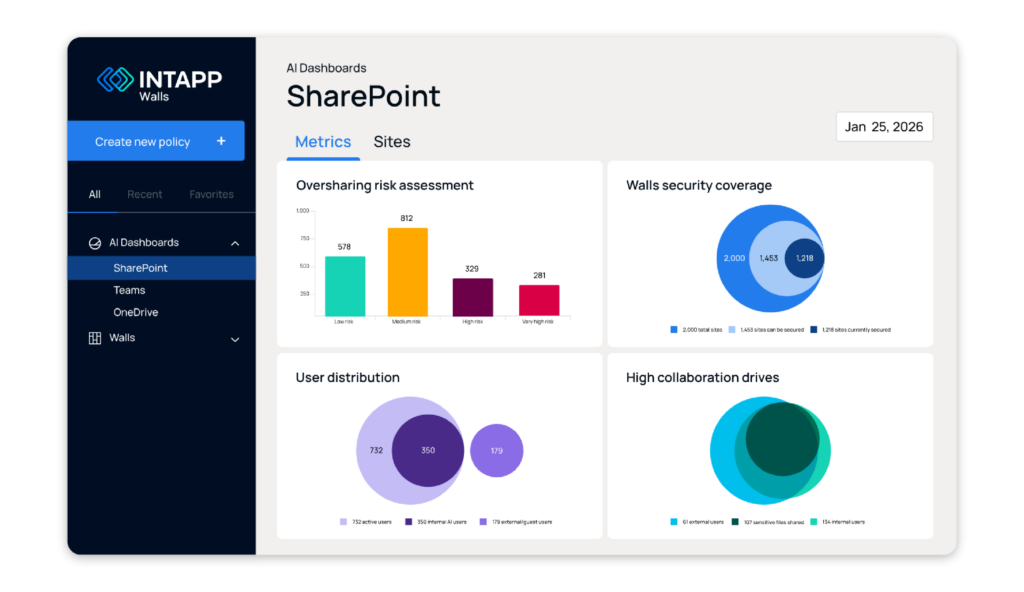
Intapp Walls for AI is the cloud version of Walls, built specifically for this environment. Walls for AI extends visibility across SharePoint, Teams, and OneDrive, flagging access patterns where users outside the matter team have inherited permissions that cloud AI tools would see. That visibility doesn’t exist in on-premises deployments. Today, the only way to find overshared sites is an IT audit run on request.
When a wall changes in Intapp Walls for AI, that change propagates to the DMS, Microsoft 365, and every connected AI platform in seconds. On-premises wall changes require separate IT actions in each system. A cloud migration simplifies that coordination.
Adding a new AI tool to a Intapp Walls for AI deployment is a policy configuration. Adding one to an on-premises deployment is a services engagement. Harvey is live. Legora is on the roadmap. Each represents a tool that on-premises Walls can’t govern.
Every AI tool your firm adds widens the gap between what on-premises Walls governs and what it can’t reach. The gap doesn’t close on its own.
The migration question
The question for firms on on-premises Walls isn’t whether a cloud migration makes sense. It’s when the compliance exposure of staying on-premises exceeds the cost of moving. The firms migrating now are doing it before their AI footprint is fully established—that’s when migration is still straightforward. Each tool you deploy adds another system outside your governance layer, and the more tools you have, the harder migration becomes and the bigger the compliance exposure while you wait.
Use the Pilot-to-Production Checklist to identify which governance gaps Intapp Walls for AI closes, so you can map the gap to your firm’s AI roadmap. Schedule a demo to see Walls for AI policy enforcement in action.
